Multiple linear regression
Interaction effects
(a) Two categorical independent variables
(b) One categorical and one continuous independent variables
(c) Two continuous independent variables
Some closing thoughts on model fit
Population Regression Function: y=a+b1(x1)+b2(x2)+ϵ
Sample Regression Function: y=ˆa+^b1(x1)+^b2(x2)+ˆe
Note: ^b1 and ^b2 are the partial regression coefficients or the partial slope coefficients
Why are they partial? They are partial in the sense that ...
holding x2 constant holding x1 constant R2=SSTRSST, with 0≤R2≤1
Note: R2 is for multiple regression; r2 is for bivariate regression
For example, with the credit.sav dataset we could estimate the following regression model:
Rating=α+β1(Income)+β2(No. of Active Cards)+ϵ
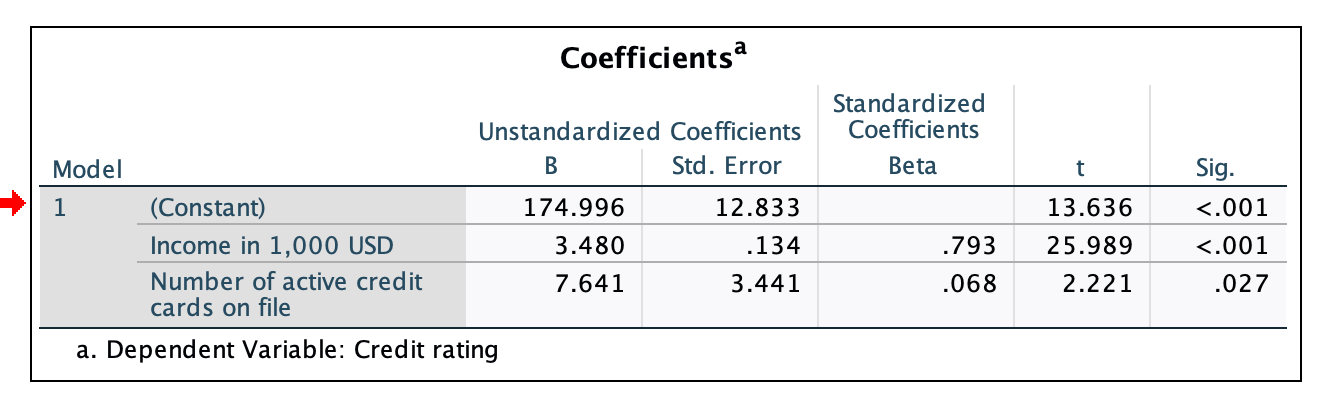
^b1=3.480: Holding the number of active cards fixed, as income increases by 1 (which is in reality an increase of 1 thousand USD), credit rating increases by about 3.48
^b2=7.641: Holding income fixed, as the number of active credit cards increases by 1, credit rating increases by 7.641
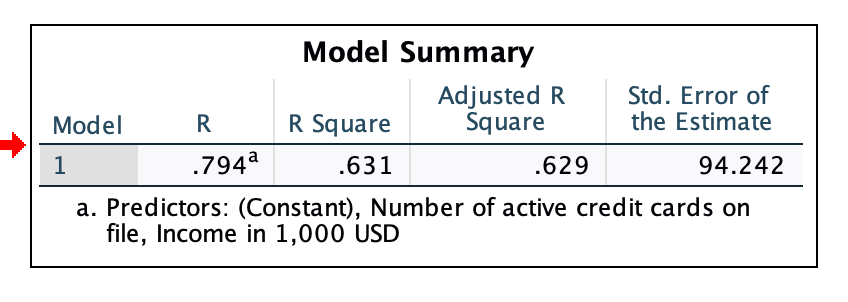
Adjusted R-Square = 0.629 ... This model predicts/explains about 62.9% of the variation in credit rating
Std. Error of the Estimate = 94.242 ... The average prediction error you can expect when using this model to predict credit ratings is ±92.242
Estimated Regression: Rating=174.996+3.48(Income)+7.641(Cards)
To generate predicted values, now you need to insert specific values of each independent variable. Recommendation is to either use particular values of interest, or then a specific set of values (see below).
(a) Calculate the Minimum, Maximum, Median, Mean, and Standard Deviation of each independent variable
(b) Calculate values that are 1 Standard Deviation above/below the Mean, and then 2 Standard Deviations above/below the Mean of each independent variable.
Check to ensure the ±1SD and ±2SD are plausible in-sample values
(c) Use the Median of each independent variable to calculate the outcome
(d) Predict the outcome holding one independent variable at its Mean and varying the other by cycling through appropriate values, either
Min;−2SD;−1SD;Mean;1SD;2SD;Max
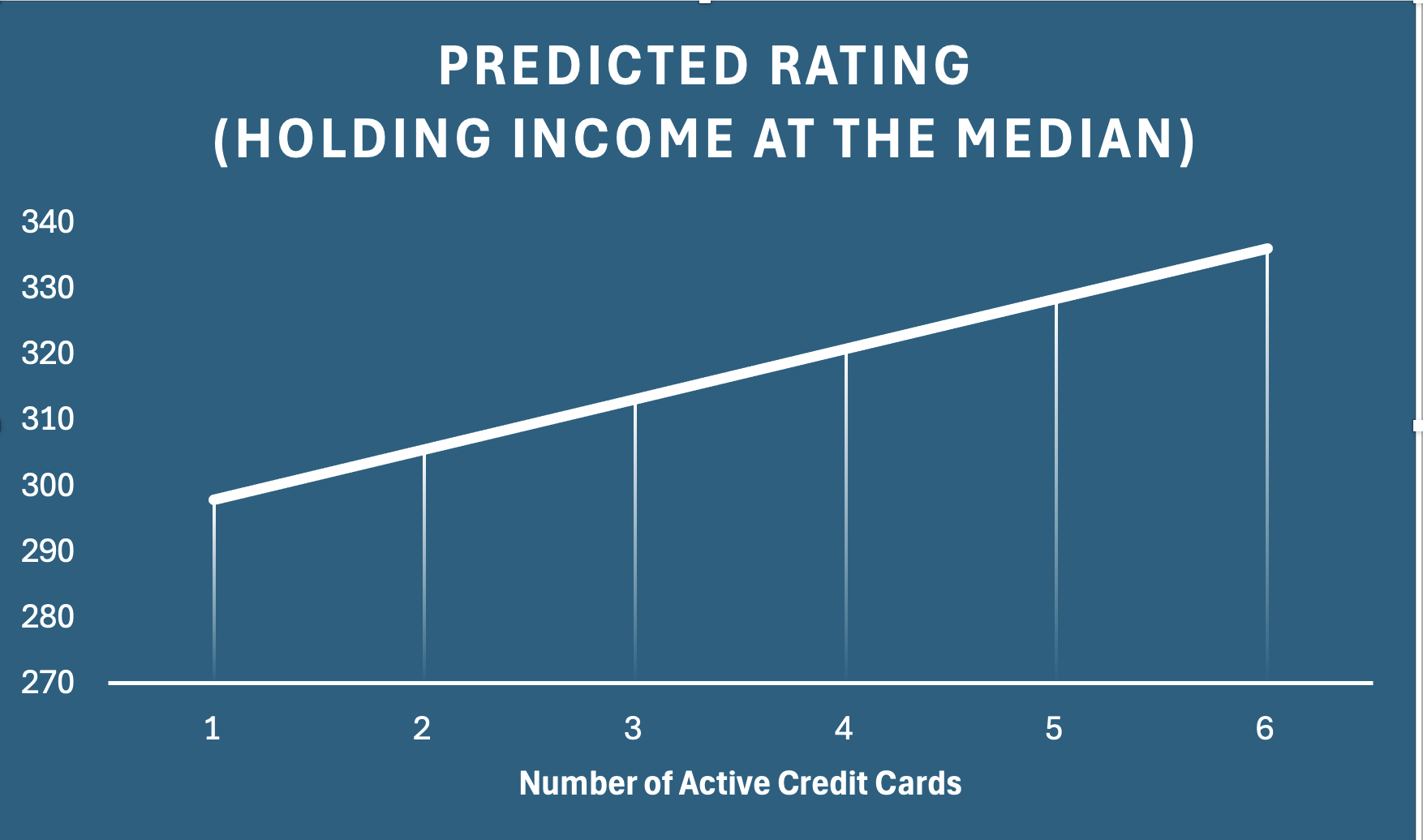
(f) Present the results graphically, one graph per varying independent variable
| Statistic | Income | Cards (held fixed) | Predicted Rating |
|---|---|---|---|
| Min | 10.35 | 3 | 233.9370 |
| -2 SD | NA | 3 | NA |
| -1 SD | NA | 3 | NA |
| Mean | 45.2189 | 3 | 355.2808 |
| Median | 33.1155 | 3 | 313.1609 |
| 1 SD | 80.4631 | 3 | 477.9306 |
| 2 SD | 115.7073 | 3 | 600.5804 |
| Max | 186.63 | 3 | 847.3914 |
The −1SD and −2SD values were implausible and hence not used
With Income as distributed in this dataset, I would just present the predicted Rating when Income is at its Min, Median, and Max, respectively, holding Cards fixed at their Median value of 3.
Since number of active cards is an integer, I would just cycle through the actual number of active cards we see in the dataset
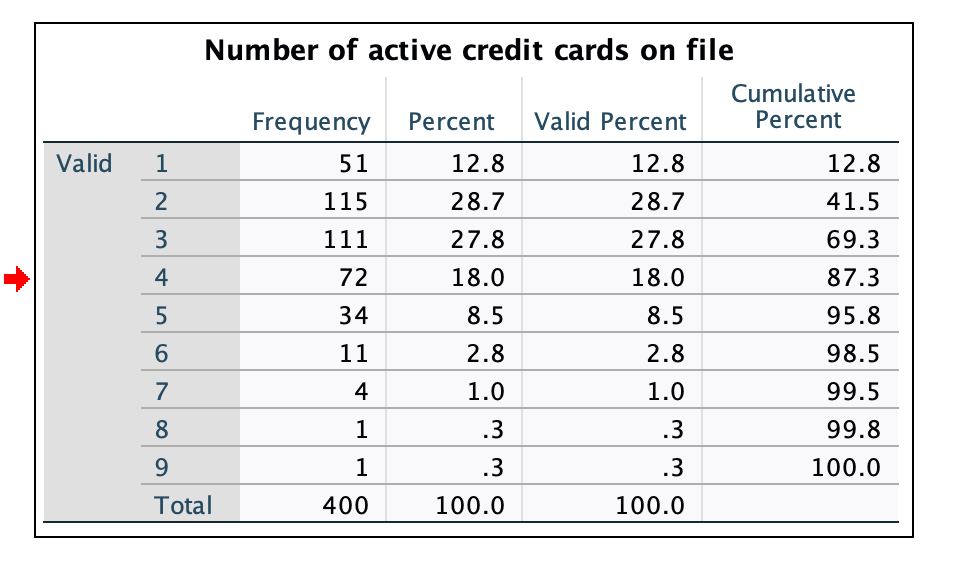
Since the upper tail is thin we may want to stop at
6
| Income (held fixed) | Cards | Predicted Rating |
|---|---|---|
| 33.1155 | 1 | 297.8789 |
| 33.1155 | 2 | 305.5199 |
| 33.1155 | 3 | 313.1609 |
| 33.1155 | 4 | 320.8019 |
| 33.1155 | 5 | 328.4429 |
| 33.1155 | 6 | 336.0839 |
The effect of an independent variable may not be constant across the values of the other independent variable. For example, maybe at low levels of education there is no difference in hourly wages of men and women. However, a difference is visible for those with more than a high school degree
This may be a suspicion, a hypothesis that we would like to test. if we wish to do so then we need to modify the regression model
Three common types of interactions:
Interactions ought to be specified on the basis of theory (preferred). However, do not hesitate to test for them if initial exploratory analysis (descriptive) of the data suggests interesting patterns
y is a continuous variable (wage)
X1 is a dummy variable (female) that assumes two values (1 = Female; 0 = Male)
X2 is a dummy variable (single) that assumes two values (1 = Single; 0 = Not Single)
X3=(X1)×(X2)
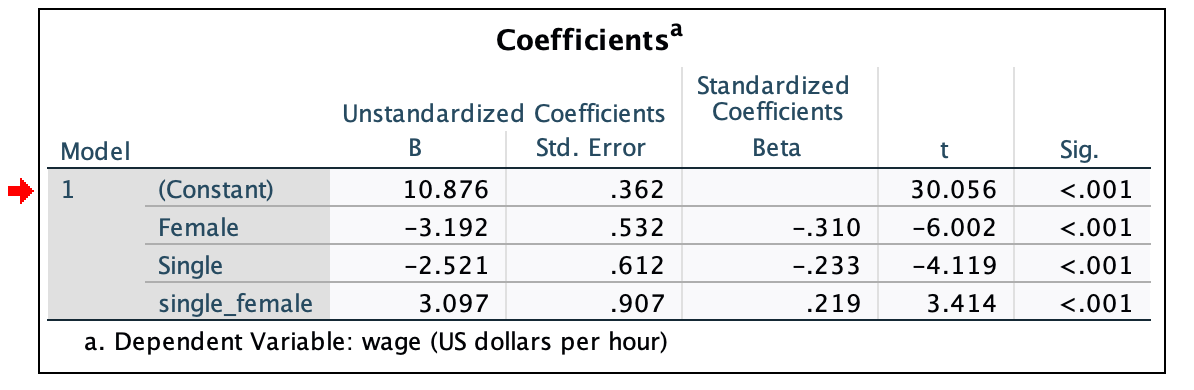
wage=a+b1(female)+b2(single)+b3(single×female)+e
| single | female | Interaction = single x female | Who is this? |
|---|---|---|---|
| 0 | 0 | 0 x 0 = 0 | not single male |
| 0 | 1 | 0 x 1 = 0 | not single female |
| 1 | 0 | 1 x 0 = 0 | single male |
| 1 | 1 | 1 x 1 = 1 | single female |

wage=a+b1(female)+b2(single)+b3(single×female)+e
Single Female: =10.876−3.192(1)−2.521(1)+3.097(1)=8.260
Married Female: =10.876−3.192(1)−2.521(0)+3.097(0)=7.684
Single Male: =10.876−3.192(0)−2.521(0)+3.097(0)=8.355
Married Male: =10.876−3.192(0)−2.521(0)+3.097(0)=10.876
The intercept is the estimated hourly wage for a married male
wage=a+b1(female)+b2(age)+b3(female×age)+ϵ
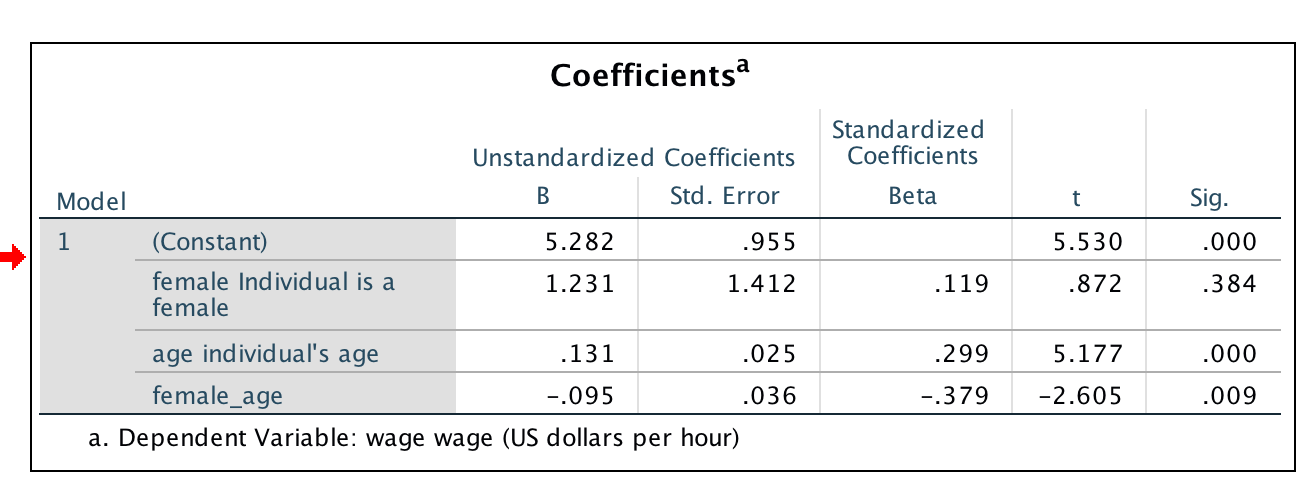
No main effect of Female (p-value = 0.384)
Main effect of age (p-value = 0.000)
Interaction effect of Female and age (p-value = 0.009) ... as age increases, the wage-gap worsens for females
Use the estimated regression model to
Calculate predicted values of wage for males with varying ages
Calculate predicted values of wage for females with the same ages you used above
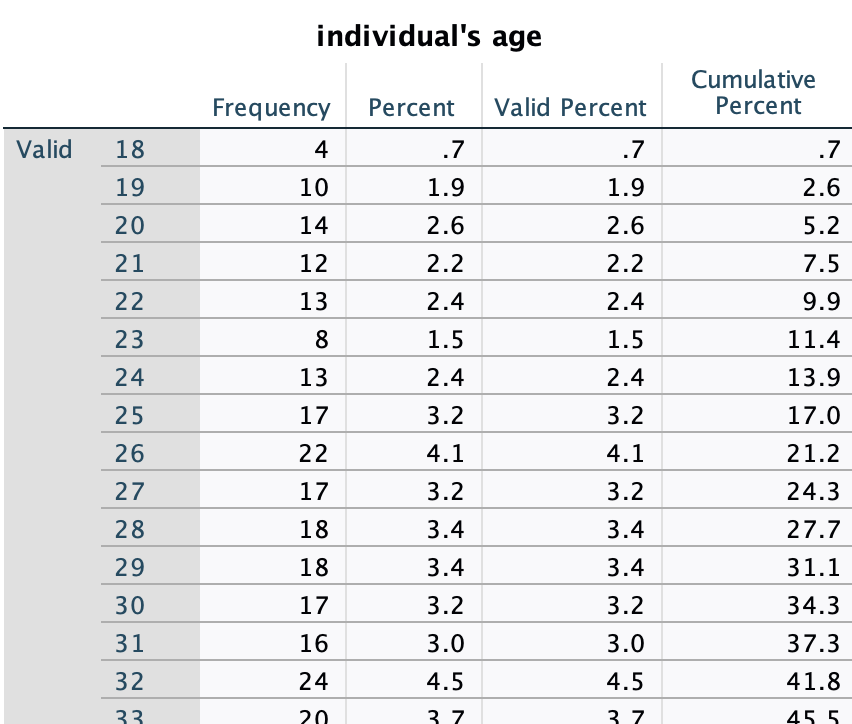
Run a frequency table for age and use the ages you see in the table
Values will be 18 through 64, in single-digit increments
wage=5.282+1.231(female)+0.131(age)−0.095(female×age)
Calculate Minimum (18), Median (35), Maximum (64) of age
Set age at Minimum and calculate predicted hourly wage for Men versus Women
Set age at Median and calculate predicted hourly wage for Men versus Women
Set age at Maximum and calculate predicted hourly wage for Men versus Women
| age | age | age | age | age | |
|---|---|---|---|---|---|
| Sex | 18 | 28 | 35 | 44 | 64 |
| Female | 7.162694 | 7.523649 | 7.776317 | 8.101176 | 8.823084 |
| Male | 7.639764 | 8.949691 | 9.866640 | 11.045575 | 13.665429 |
| Difference | 0.4770696 | 1.4260426 | 2.0903237 | 2.9443994 | 4.8423453 |
Note the increasing wage-gap as age increases
y=a+b1(x1)+b2(x2)+b3(x3)+ϵ where x3=(x1)×(x2)
If b3>0, the higher is x1, the more the effect of x2 on y and likewise, the higher is x2, the more the effect of x1 on y
If b3<0 then effects are reversed (i.e., the higher is xi the less the effect of xj on y)
Note also that b1 and b2 now reflect conditional relationships:
b1 is the effect of x1 on y when x2=0.
b2 is the effect of x2 on y when x1=0
When interpreting our regression coefficients, we are forced to say that the effect of a unit change in one variable depends upon the value of the other variable
If you have an interaction effect in your model, you must include the x1 and x2 as well even if they are not statistically significant
Calculating impacts of variables ...
Hold xi at its mean and tweak xj by ±1, ±2 standard deviations, or
Hold xi at its median and change the other by discrete units (for e.g., for variable that ranges from 0% to 100% you could tweak from MIN to MAX by 10%) ... This is the preferred strategy!!

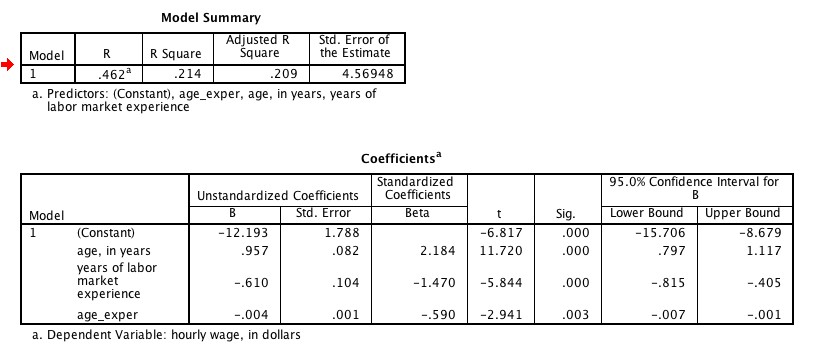
Calculate Minimum, Median, Maximum for age and for exper, respectively
Now hold age at Minimum and tweak exper
Now hold exper at Minimum and tweak age
Repeat by setting each, in turn, at Median, then at Maximum
With missing data, all descriptive statistics must be calculated for the
estimation sampleand not the full sample since if you have missing data, the descriptive statistics of the estimation sample can differ from those of the full sample
wage=−12.193+0.957(age)−0.610(exper)−0.004(age×exper)
| age | age | age | age | age | |
|---|---|---|---|---|---|
| exper | 18 | 28 | 35 | 44 | 64 |
| 0 | 5.033918 | 14.604271 | 21.303518 | 29.916835 | 49.057541 |
| 8 | -0.4178636 | 8.8359545 | 15.3136271 | 23.6420634 | 42.1496995 |
| 15 | -5.188172 | 3.788678 | 10.072473 | 18.151638 | 36.105338 |
| 26 | -12.684372 | -4.142757 | 1.836373 | 9.523827 | 26.607057 |
| 55 | -32.447081 | -25.052904 | -19.876980 | -13.222221 | 1.566133 |
What seems odd about this table's structure and data??
age = 18, exper = 0
age = 28, exper = (Min = 5, Max = 15)
age = 35, exper = (Min = 11, Max = 21)
age = 44, exper = (Min = 22, Max = 29)
age = 64, exper = (Min = 40, Max = 65)
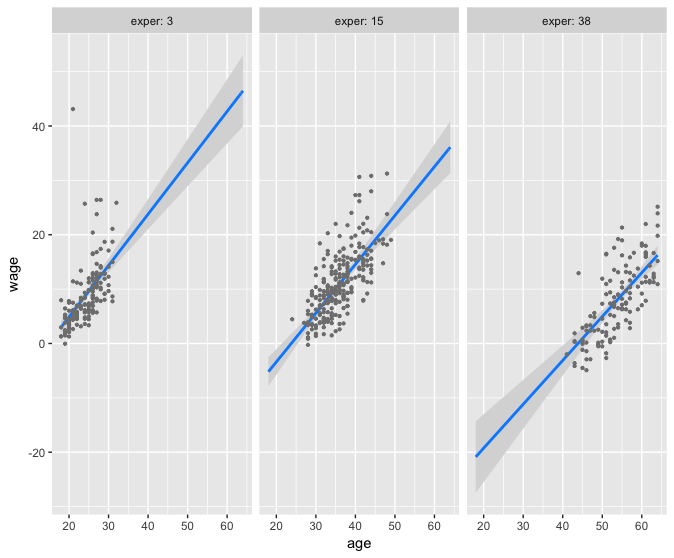
Important to scan the data to avoid impossible predictions being generated. Better yet, generate predicted values' plots such as the one that follows.

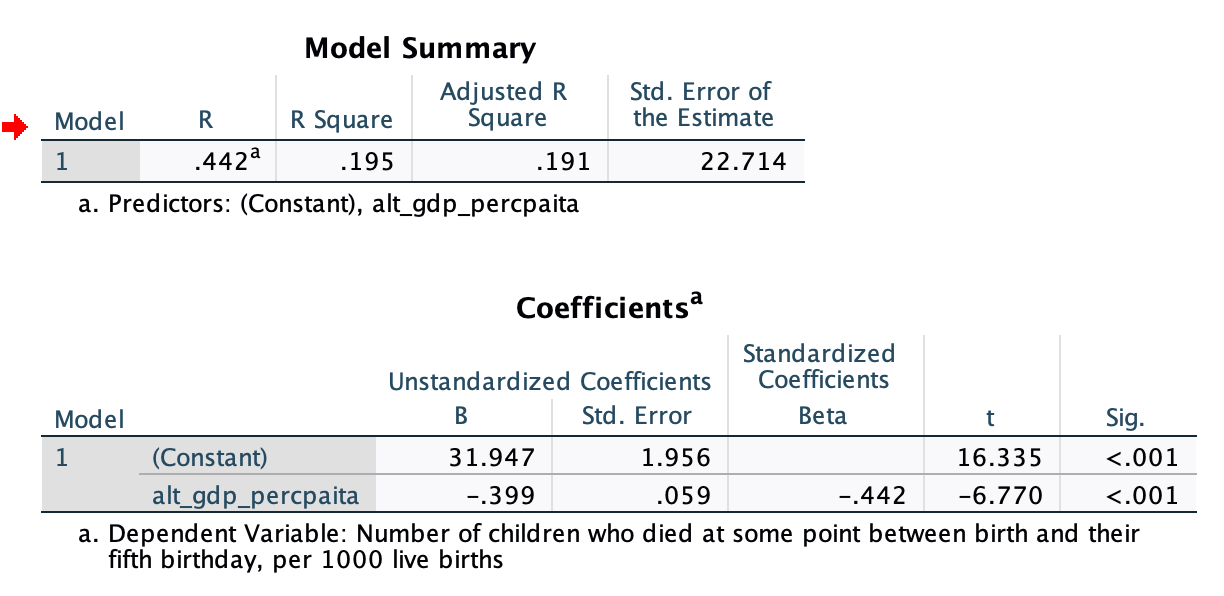
u5mr is the dependent variable (aka the outcome of interest)
NOTE!! Convert GDP per capita into GDP per capita in 1,000 USD
Some cautions ... Regression models are built on several features
very highly correlated U5MR=Constant+b1(GDP)

U5MR=Constant+b1(GDP)+b2(AdultLiteracy)
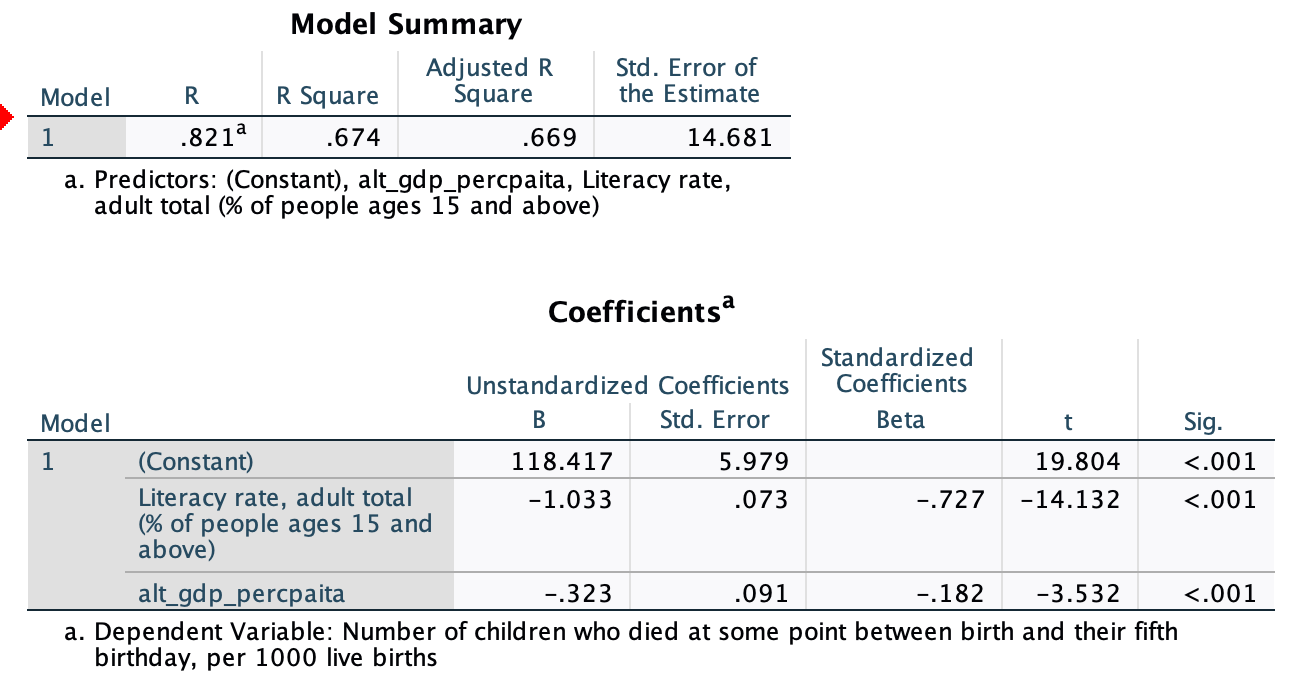
Interpret the partial slopes, adjusted R-Square, and the Standard Error of the Estimate
Notice the jump in the R-Square and the Adjusted R-Square
H0: GDP per capita has no impact on child mortality, i.e., H0:b1=0
H1: GDP per capita has an impact on child mortality, i.e., H1:b1≠0
H0: Adult Literacy has no impact on child mortality, i.e., H0:b2=0
H1: Adult Literacy has an impact on child mortality, i.e., H1:b2≠0
H0: As GDP per capita increases child mortality stays the same or increases, i.e., H0:b1≥0
H1: As GDP per capita increases child mortality decreases (i.e., H1:b1<0
H0: As Adult Literacy increases child mortality stays the same or increases, i.e., H0:b2≥0
H1: As Adult Literacy increases child mortality decreases, i.e., H1:b2<0
NOTE!! Two-tailed when we don't know what to expect but one-tailed when we have very specific impacts we hypothesize should be evident
Use the following independent variables:
(1) female youth literacy rates
(2) male youth literacy rates
(3) percent of the GDP spent on health
(4) density of nurses and midwives
(5) percent of the total population living in urban areas
What is the Adjusted R-Square now?
What is the average prediction error now?
How many independent variables are significant now?
Check!!Multiple linear regression
Interaction effects
(a) Two categorical independent variables
(b) One categorical and one continuous independent variables
(c) Two continuous independent variables
Some closing thoughts on model fit
Keyboard shortcuts
| ↑, ←, Pg Up, k | Go to previous slide |
| ↓, →, Pg Dn, Space, j | Go to next slide |
| Home | Go to first slide |
| End | Go to last slide |
| Number + Return | Go to specific slide |
| b / m / f | Toggle blackout / mirrored / fullscreen mode |
| c | Clone slideshow |
| p | Toggle presenter mode |
| t | Restart the presentation timer |
| ?, h | Toggle this help |
| Esc | Back to slideshow |